 comparison
Invoicing Software vs Spreadsheets for Contractors
Table of Contents
- Invoicing Software vs Spreadsheets: Core Differences
- Why Spreadsheets Fall Short as Your Business Scales
- Job Costing Software for Contractors: What It Actually Does
- Contractor Invoice Best Practices and Software Capabilities
- Construction Invoice Template Excel vs Cloud-Based Solutions
- Tax Compliance and Security for Contractor Data
- Invoicing Software vs Spreadsheets: Which Wins for Your Workflow
- Conclusion
Last Updated: August 4, 2026
When contractors face the choice between invoicing software vs spreadsheets for contractors, they're really deciding between two fundamentally different approaches to running their business. One keeps you stuck in manual processes. The other scales with you. At SolvPro, we've worked with field service teams who made this exact decision, and the data tells a consistent story: the moment you move beyond five active projects, spreadsheets become a liability, not a tool.
The gap between these two approaches isn't just about convenience. It's about whether your business can actually grow without hiring someone full-time to manage paperwork. Let's walk through exactly where each wins, where it fails, and which one makes sense for your specific situation.
Invoicing Software vs Spreadsheets: Core Differences
The fundamental difference comes down to automation versus manual work. A spreadsheet requires someone to open it, type numbers, update formulas, send the file, and hope nothing gets lost. Invoicing software collects data from your field operations, populates invoice templates automatically, and sends them with a single click. One is reactive. The other is proactive.
Here's what separates them at the operational level: spreadsheets live in a file. They don't talk to your accounting system, your payment processor, or your scheduling tool. Everything must be manually synced. Invoicing software integrates with your ecosystem, QuickBooks, payment gateways, expense tracking, time logs, so data flows automatically from job completion to invoice to payment.
Manual Data Entry and Automation
Manual data entry is where most spreadsheet-based invoicing fails. Someone finishes a job, writes the details on a work order, returns to the office, opens the spreadsheet, and types everything in again. If they transpose a number or forget a line item, the invoice is wrong. If they type it three days later, the client is already wondering about payment.
Invoicing software eliminates this step. Your crew enters job details once, either on site using mobile apps or back at the office, and the software populates the invoice automatically. No re-entry. No transcription errors. No delays waiting for someone to get back to the office.
The time savings compound fast. A contractor managing ten active jobs might spend 3-4 hours per week on manual invoice entry alone. That's 150 hours per year. At a loaded labor cost of $50 per hour, you're spending $7,500 annually just typing numbers into a spreadsheet. Invoicing software can offer significant time and cost savings.
Error Risk and Data Accuracy
Spreadsheets are error-prone by design. Formula mistakes, copy-paste errors, accidental overwrites, and version confusion are endemic. You might have three people working on the same spreadsheet, each with a slightly different version. Which one is current? Nobody knows until invoices go out with conflicting information.
Invoicing software enforces data integrity. When you create an invoice, the software pulls information from a single source of truth. Line items come from the job record. Rates come from your standard pricing or the specific quote. Client information is stored once and reused. There's no ambiguity about which version is correct because there's only one.
Error rates matter because mistakes cost real money. A missing line item means lost revenue. An incorrect rate means you're undercharging. A typo in the client's name or address delays payment. Invoicing software can significantly reduce these errors by removing the manual transcription step.
Why Spreadsheets Fall Short as Your Business Scales

Spreadsheets work fine when you're running one or two projects at a time. Everything fits in your head. But the moment you scale to multiple crews, multiple project types, and multiple clients, spreadsheets become a bottleneck instead of a tool.
The core problem is that spreadsheets don't scale. They're static files designed for simple calculations, not dynamic business operations. Add more projects, and the spreadsheet gets bigger and slower. Add more users, and version control becomes a nightmare. Add more complexity, different rates for different clients, seasonal pricing, change orders, and the spreadsheet becomes unmaintainable.
Audit Trails and Compliance Gaps
Spreadsheets have no audit trail. You can't see who changed what, when, or why. If an invoice amount shifts between versions, there's no record of the change. If a client disputes a charge, you have no documented proof of what was agreed. If you're audited by the IRS, you can't demonstrate the integrity of your financial records.
Invoicing software maintains a complete audit trail. Every change is logged with a timestamp and user attribution. If an invoice is modified, you can see exactly what changed and who made the change. This creates accountability and provides legal protection.
For contractors, audit trails matter for tax compliance. The IRS expects you to maintain records that show income, expenses, and the basis for deductions. A spreadsheet doesn't prove anything. An invoicing system with timestamped entries, client information, job details, and payment records does.
Scalability Limitations
Spreadsheets can become unwieldy with large amounts of data. Performance can degrade, formulas can slow down, and managing complexity becomes challenging. It can be difficult to run comprehensive reports, filter by specific criteria, or forecast cash flow efficiently.
Invoicing software is built for scale. Whether you add 100 projects or 1,000, the system performs consistently. Reporting becomes easier, not harder. You can filter by any criteria, generate aging reports, track payment status, and forecast cash flow with a few clicks.
For growing contractors, this scalability difference determines whether you can actually manage growth. Spreadsheets can necessitate hiring administrative staff just to keep up with data entry. Invoicing software lets you grow revenue without proportional growth in overhead.
Job Costing Software for Contractors: What It Actually Does
Job costing software for contractors goes beyond invoicing. It tracks costs against revenue at the project level, so you know whether each job is profitable. A spreadsheet might show you total revenue and total expenses. Job costing software shows you the margin on each individual project.
This distinction matters because it changes how you price future work. If you know that certain project types consistently run under budget while others run over, you can adjust your pricing. Spreadsheets don't give you this visibility. You're flying blind.
Real-Time Project Tracking
Real-time project tracking means you see the financial status of every active job at any moment. How much has been spent on materials? How many labor hours have been logged? What's the remaining budget? Is the project tracking to profitability?
With a spreadsheet, this information is historical. You update it after work is done, after expenses are recorded, after time is logged. By then, it's too late to adjust course. If a project is running over budget, you don't know until it's already unprofitable.
Invoicing software with real-time tracking lets you see problems as they develop. A crew is spending more time on a job than estimated? You see it immediately. Material costs are running high? You catch it before the project goes underwater. This visibility lets you make adjustments in real-time instead of discovering problems after the fact.
Cost-Benefit Analysis: Free vs Subscription
The cost question is straightforward. A spreadsheet is free. Invoicing software involves a subscription fee, which can vary depending on features and user count. For a solo contractor or very small operation, that's an expense to consider.
But the cost-benefit calculation changes when you factor in time savings and error reduction. If invoicing software saves five hours per week and prevents one billing error per month, the financial case is clear. Five hours at $50 per hour is $250 per week, or $13,000 per year. One prevented error might mean significant recovered revenue. Against a software cost, the ROI can be substantial.
The real question isn't whether invoicing software is free. It's whether your time is worth more than the monthly cost of a solution. For almost every contractor, the answer is yes.
| Metric | Spreadsheet | Invoicing Software |
|---|---|---|
| Monthly cost | $0 | Pricing depends on features and user count |
| Time per invoice | 15-20 minutes | 2-3 minutes |
| Error rate | 5-10% | Can be significantly lower |
| Audit trail | None | Complete |
| Integration capability | Manual | Automatic |
| Scalability limit | Can become unwieldy with large data sets | Designed for scalability |
| Payment tracking | Manual | Automatic |
Contractor Invoice Best Practices and Software Capabilities
Professional invoicing isn't just about sending a bill. It's about creating a document that reflects your professionalism, makes payment easy for your client, and provides legal protection for you.
Professional Templates and Branding
Your invoice is a touchpoint with your client. A spreadsheet printed to PDF looks like a spreadsheet. It raises questions about your professionalism and attention to detail. A properly designed invoice template signals that you run a professional operation.
Invoicing software includes professionally designed templates that you can customize with your logo, colors, and branding. The invoice looks polished. It includes all necessary information, your business details, client details, line items, terms, payment methods. It's organized and easy to read.
This matters more than you might think. Clients who receive professional-looking invoices often pay faster. They're more confident in your business. They're more likely to refer you to others. A software tool that improves your invoice appearance can generate more revenue through better client perception.
Payment Tracking and Cash Flow Management
Cash flow is the lifeblood of contracting. You need to know which invoices are paid, which are overdue, and which are pending. A spreadsheet requires manual updates. You send an invoice, then you have to remember to track whether it's been paid. If you're managing dozens of invoices across multiple clients, this becomes chaotic.
Invoicing software tracks payment status automatically. When a client pays online, the system knows immediately. It can send automatic reminders for overdue invoices. It can generate aging reports showing you exactly how much money is outstanding and how long it's been outstanding.
For contractors operating on thin margins, this visibility is critical. If you have a significant amount of invoiced work outstanding, you need to know that immediately. You might need to adjust your cash flow, delay purchases, or follow up with clients. A spreadsheet won't tell you this. Invoicing software will.
Construction Invoice Template Excel vs Cloud-Based Solutions
The construction invoice template Excel approach, creating a custom spreadsheet template and copying it for each new invoice, is a common middle ground. It's more structured than a blank spreadsheet, but it's not a true invoicing system.
The problem with this approach is that it still requires manual data entry. You create a new copy of the template, fill in the fields, save it with a specific naming convention, and hope you don't lose track of which version is current. If you need to modify an invoice after sending it, you're creating a new file with a new version number. Tracking can become impossible.
Offline Functionality and Mobile Access
Cloud-based invoicing software requires an internet connection, which can be a limitation if your crews work in areas with spotty connectivity. This is a real concern for some contractors, particularly those working in rural areas or underground.
However, modern invoicing software typically includes offline functionality. Your crew can enter job details offline on a mobile device. When the connection returns, the data syncs to the cloud. This solves the connectivity problem while maintaining the benefits of a centralized system.
Excel spreadsheets, by contrast, are inherently offline, but that's their weakness, not their strength. Offline spreadsheets can't sync data across devices. If two people make changes to the same spreadsheet while offline, you get version conflicts that are painful to resolve.
Data Migration and Integration Strategy
If you're currently using spreadsheets and considering a switch to invoicing software, data migration is a legitimate concern. How do you move years of historical invoices and client information into a new system?
Most invoicing software makes this straightforward. You export your spreadsheet data, map the columns to the software's fields, and import. The process typically takes a few hours for even large datasets. Once imported, your historical data is available for reporting and reference.
The integration piece is equally important. Your invoicing software should connect to your accounting system, such as QuickBooks Online. This means invoice data flows directly into your accounting records without manual entry. Payments recorded in your invoicing system automatically update your accounting system. This integration eliminates an entire category of manual work and reconciliation errors.
Tax Compliance and Security for Contractor Data
Contractors face specific tax obligations that generic invoicing tools don't always address well. You need to track income by category, document business expenses, maintain records of subcontractor payments, and substantiate deductions.
Tax Deductions and Expense Management
Spreadsheets force you to manually categorize expenses and reconcile them against invoices. You receive a receipt, type it into a spreadsheet, assign it to a category, and hope you've captured everything at tax time.
Invoicing software that integrates with expense tracking tools automates this. Receipt images are captured, categorized automatically, and linked to projects. When you prepare your tax return, you have complete documentation of every expense, organized by category, linked to the jobs they relate to.
For contractors, this changes the tax compliance picture. Instead of scrambling to find receipts at tax time, you have a complete, organized record. You can substantiate every deduction. You can identify tax-saving opportunities you might have missed. You can work with your accountant more efficiently because the data is already organized.
Data Ownership and Security
A spreadsheet stored on your computer is your responsibility. If your computer is hacked, your financial data is exposed. If your hard drive fails, your data is gone unless you have backups. You're managing security and disaster recovery on your own.
Cloud-based invoicing software shifts this responsibility to the software provider. They maintain redundant backups, encrypt data in transit and at rest, and manage security patches. They're subject to compliance requirements that often include regular security audits.
For most contractors, this is a net positive. Professional security is often better than DIY security. But it does mean your data is stored on someone else's servers, which raises legitimate concerns about privacy and control.
The trade-off is clear: cloud-based software can offer enhanced security features compared to a spreadsheet on your computer, but less direct control than a spreadsheet on an encrypted, offline device. The practical choice for most contractors is cloud-based invoicing because the security benefits often outweigh the theoretical loss of control.
Invoicing Software vs Spreadsheets: Which Wins for Your Workflow
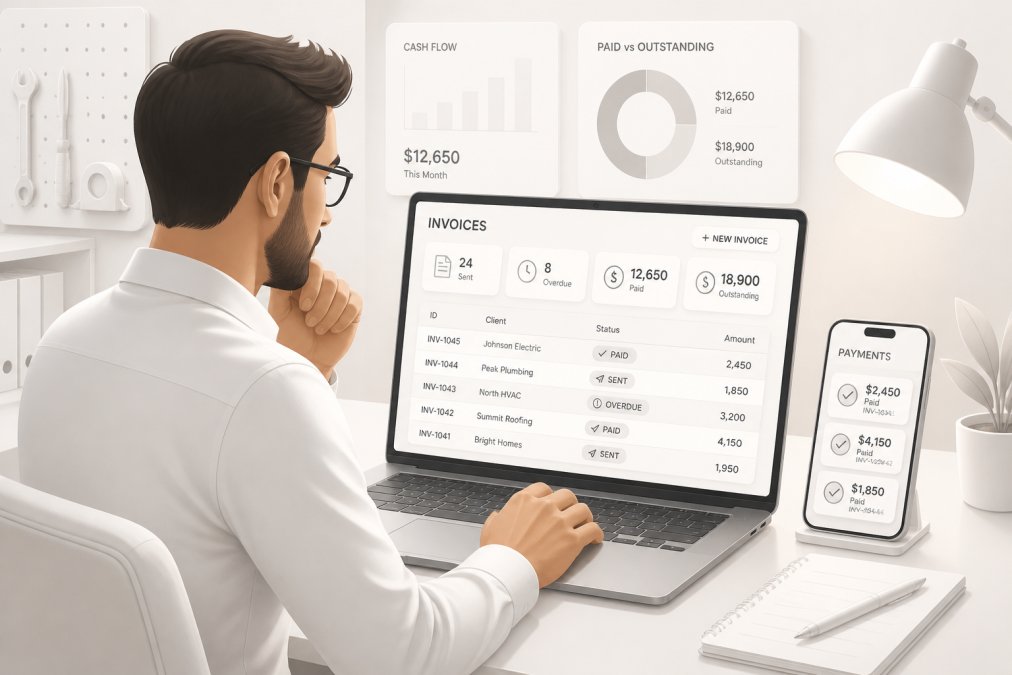
The answer depends on your specific situation. There are scenarios where spreadsheets still make sense. There are scenarios where invoicing software is non-negotiable.
When Spreadsheets Still Make Sense
Spreadsheets work if you're a solo contractor running one or two projects at a time, you handle all invoicing yourself, and you don't need integration with accounting software. If you're a freelancer doing occasional gigs, a spreadsheet is probably overkill.
Spreadsheets also work as a temporary solution while you're evaluating invoicing software. Use a spreadsheet for a month, track how much time you spend on invoicing and billing, and calculate the ROI of switching. If the time savings don't justify the cost, stick with the spreadsheet.
But be honest about your situation. If you're telling yourself "spreadsheets work fine" while spending three hours every Friday on invoice management, you're not being realistic. Spreadsheets work until they don't. The moment you're frustrated with manual processes is the moment to switch.
When to Switch to Dedicated Software
Switch to invoicing software when any of these are true: you manage more than five active projects, you have multiple team members, you're missing invoices or losing track of payment status, you're spending more than two hours per week on invoicing, or you need integration with accounting software.
Switch immediately if you're currently using spreadsheets to track client payments and you've ever lost track of which invoices are paid. This is the single biggest red flag that your system is failing.
Switch if you're doing work in multiple locations or your crews are mobile. Mobile invoicing software lets your teams create invoices from the field, which means clients get billed the same day work is completed instead of days later when someone gets back to the office.
For most contractors past the very early stage, invoicing software is the right choice. The time savings alone can justify the cost. The error reduction protects your revenue. The integration with accounting software simplifies tax preparation. The audit trail provides legal protection.
The choice between invoicing software vs spreadsheets for contractors comes down to whether you're optimizing for simplicity or for growth. Spreadsheets optimize for simplicity, they're free and familiar. Invoicing software optimizes for growth, it scales with your business, reduces errors, and frees up your time for actual work.
If you're managing a growing contracting business, spreadsheets are holding you back. SolvPro brings invoicing, job costing, crew tracking, and payment processing into one platform with bilingual support and QuickBooks Online integration. Your teams can create invoices from the field, clients get billed faster, and you get paid sooner. Start your free trial and see how much time you can reclaim.
Frequently Asked Questions
Why should we switch from spreadsheets to invoicing software if our current system is working?
Spreadsheets create hidden costs as your business grows. Manual data entry introduces errors that damage client relationships and trigger payment delays. Without audit trails, you cannot prove compliance during tax reviews. Invoicing software automates recurring tasks, reduces human error, and provides real-time reporting. Most contractors report 8-12 hours per week saved on administrative work. For teams managing multiple crews and projects, this translates to faster cash flow and fewer billing disputes.
How does job costing software for contractors improve profitability?
Job costing software tracks material costs, labor hours, and equipment expenses against each project in real time. This reveals which jobs are profitable and which drain margins. Spreadsheets cannot update live as crews work in the field, so you discover cost overruns weeks late. Cloud-based job costing integrates with time-tracking and expense management, so you capture actual costs automatically. This data helps you bid future projects accurately and identify operational inefficiencies before they compound.
What are the main contractor invoice best practices that invoicing software handles automatically?
Professional invoicing software enforces best practices: clear itemization of work performed, consistent numbering and dating, tax compliance formatting, and payment terms visibility. It automates recurring invoices for ongoing service contracts, sends payment reminders before due dates, and tracks invoice aging to flag overdue amounts. Spreadsheets require manual updates for each step, increasing the chance of missed reminders or inconsistent formatting. Software also integrates with QuickBooks Online and other accounting platforms, so invoice data flows directly into your financial records without re-entry.
Can we migrate our existing data from a construction invoice template Excel to cloud software without losing history?
Yes, most invoicing platforms support data migration from Excel exports. The process involves exporting your spreadsheet in a standard format (CSV or XLS) and importing it into the new system. However, historical data migration requires planning: verify that customer names, project codes, and payment terms match between systems to avoid duplicate records. Some platforms offer guided migration support. Once migrated, your historical invoices remain accessible for audit purposes, and future invoices benefit from automation, digital signatures, and payment gateway integration that spreadsheets cannot provide.
How does invoicing software help with tax compliance for contractors compared to spreadsheets?
Invoicing software automatically categorizes expenses, tracks deductible items, and maintains audit trails showing when invoices were created, modified, and paid. This documentation is critical during tax reviews. Spreadsheets lack version control, so you cannot prove which data was original and which was edited. Cloud-based platforms store data securely with encrypted backups, protecting your tax records. Many integrate with accounting software like QuickBooks Online, which simplifies quarterly tax preparation and self-employment tax calculations. For contractors managing multiple crews or locations, this centralized record-keeping reduces audit risk and accelerates tax filing.
This article was written using GrandRanker