 how-to
How to Improve Site Preparation Logistics Efficiency
Table of Contents
- Step 1: Map Your Current Site Preparation Workflow
- Step 2: Use Top Rated Construction Scheduling Tools
- Step 3: Apply Construction Material Kitting Best Practices
- Step 4: Reduce Site Mobilization Downtime
- Step 5: Improve Site Preparation Logistics with Real-Time Tracking
- Step 6: Integrate BIM and Sustainability into Site Preparation Logistics
- Common Mistakes That Hurt Site Preparation Logistics Efficiency
- Frequently Asked Questions
Last Updated: September 14, 2026
Step 1: Map Your Current Site Preparation Workflow
Site preparation logistics is the coordination of people, equipment, and materials needed to get a construction site ready for building, from clearing and grading through utility installation and mobilization. Without a clear map of how that work flows, every later improvement is guesswork.
Write down every step from job award to groundbreaking. Most excavation and site work companies lose surprising time in handoffs: estimator notes never reach the field crew, the equipment list gets rebuilt, and nobody knows which subcontractor confirmed for Tuesday.
Map it in plain language, not software jargon:
- List every task between contract signing and first dig
- Note who owns each task and how long it usually takes
- Flag every point where information gets re-entered or verbally relayed
- Mark where delays typically occur
That last item matters most. Don't map the process as it's supposed to work, walk the job trailer, ask the foreman where things stall, and write down what you hear. You'll usually find two or three handoff points causing most of the friction; those become your first targets.
Step 2: Use Top Rated Construction Scheduling Tools
The best scheduling tool is the one your field crews actually open on their phones. Top rated construction scheduling tools share three traits: mobile-first design, real-time office-to-field sync, and change order handling without a phone call.
Spreadsheets work until they don't. Juggling five crews, two excavators, and a moved delivery window turns a static sheet into a liability. Look for tools that push schedule changes to everyone at once, so the foreman isn't working from yesterday's plan.
Before evaluating any tool, decide which scheduling method it must support. Site preparation rarely fits a simple task list; most successful schedules use one of these approaches:
- Critical Path Method (CPM): Identifies the longest sequence of dependent tasks (for example, clearing → rough grading → utility trenching → backfill → fine grading). Any delay on the critical path pushes the whole job. Tools that calculate float automatically save hours of manual recalculation when a permit inspection slips.
- Look-ahead schedules: A rolling two- to four-week window that shows what each crew and subcontractor must complete next (agc.org). This is the format field supervisors actually use, because it answers "what am I doing Thursday?" rather than showing a 90-day Gantt chart nobody reads.
- Constraint-based scheduling: Every task is tagged with what must be true before it can start, permit approved, utility locate completed, material kit staged, equipment available. When a constraint is unresolved, the task is flagged. This prevents the classic failure where a crew shows up to trench and the locate marks aren't there yet.
When evaluating options, score them against your actual workflow:
| Evaluation Criteria | Why It Matters | Red Flag |
|---|---|---|
| Mobile accessibility | Crews update status from the field | Desktop-only interface |
| Real-time sync | Office and field see the same schedule | Manual refresh required |
| Change order handling | Scope shifts happen constantly | Requires re-entry of data |
| Bilingual support | Mixed-language crews need clarity | English-only work orders |
| Accounting integration | Invoicing shouldn't be manual | No export to your books |
| Constraint tracking | Prevents crews arriving to blocked tasks | No dependency logic |
| Offline mode | Basements and remote sites lose signal | Requires constant connectivity |
Pay attention to the schedule-to-field handoff. A dispatcher who can drag a task to a new day and have it appear on the foreman's phone within seconds beats a prettier dashboard. Ask vendors to demonstrate a live change order and watch how long it takes to reach the field view.
SolvPro was built for exactly this problem: an all-in-one field service management platform that centralizes scheduling, work orders, crew tracking, and digital contracts in one place. Its bilingual English and Spanish support matters for site prep crews, and QuickBooks Online integration means the schedule and the invoice stay connected instead of living in separate systems.
Adoption fails when the field sees scheduling software as extra paperwork. Pick a tool that replaces a step rather than adds one. A useful test: can a foreman update task status in under 20 seconds with dirty gloves on? If not, the data will be stale by noon.
Step 3: Apply Construction Material Kitting Best Practices
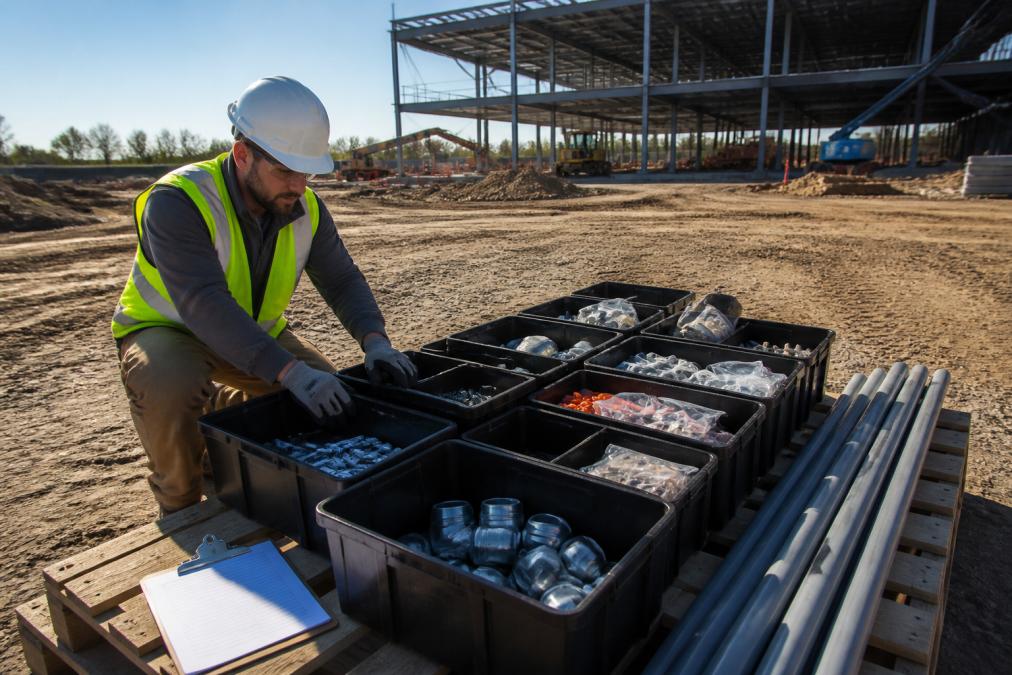
Construction material kitting best practices come down to one principle: assemble everything a task needs before it reaches the site. Kitting turns your staging yard into a smart warehouse, where each pallet or bin contains exactly the materials for one phase of work.
Instead of hunting for fittings, pipe, or geotextile fabric, crews grab a labeled kit and start. This cuts handling time, reduces yard trips, and simplifies inventory because you track kits, not loose items.
Practical kitting rules that hold up on real jobs:
- Kit by task or phase, not by material type
- Label every kit with the job number and install location
- Stage kits in the order they'll be needed, not alphabetically
- Photograph each completed kit before it leaves the yard
That last step resolves most delivery disputes before they start. If a crew claims a kit arrived short, you have a timestamped image.
A common mistake is over-kitting: building kits too far ahead ties up inventory and creates confusion when the schedule shifts. Kit close to the install date, and keep a small buffer of high-use consumables on site rather than in kits.
Step 4: Reduce Site Mobilization Downtime
Reducing site mobilization downtime starts with treating the first hour of every shift as a process, not a scramble. Mobilization is everything between a crew arriving and productive work beginning: equipment checks, fuel, safety briefings, and locating tools.
Most downtime hides in predictable places: equipment not serviced the night before, a trailer parked behind another vehicle, materials staged at the wrong end of the site. None are emergencies, but together they eat a meaningful slice of every working day.
Fix the predictable parts first:
- Pre-stage equipment and materials the evening before
- Run a five-minute shift briefing with a written task list
- Assign one person to confirm utilities and access are clear
- Keep a mobile checklist so nothing depends on memory
Site accessibility and logistics coordination go hand in hand here. If a delivery truck can't reach the staging area because a sub parked in the way, the whole sequence breaks. Designate delivery windows and keep access routes clear as a standing rule, not an afterthought.
Step 5: Improve Site Preparation Logistics with Real-Time Tracking
Real-time tracking turns your site into a live picture instead of a morning guess. GPS tracking, crew status updates, and delivery confirmations feed one view, so the office knows what's actually happening rather than what was planned.
Effective tracking operates in layers, and each layer answers a different question:
- Asset layer (telematics): GPS plus engine-hour and idle-time data on excavators, dozers, and skid steers. Answers "where is the machine and is it working?" Most OEM telematics systems (for example, those on major equipment brands) expose this data through an API, so it can flow into your scheduling tool rather than a separate portal.
- Material layer: Barcode or RFID scanning at the staging yard and at delivery. Answers "did the kit arrive, and is it complete?" This is where kitting and tracking connect, a scanned kit is a tracked kit.
- People layer: Crew check-in/check-out, task status changes, and safety briefing completion. Answers "who is on site and what are they doing?"
- Delivery layer: Carrier ETAs, gate check-in times, and unloading duration. Answers "when will the next truck arrive, and how long will it block the access road?"
The payoff shows up in resource management. When you can see that an excavator is idle because a permit inspection is running late, you can redirect that machine to another task instead of paying for it to sit. According to the Associated General Contractors of America's construction outlook, labor and equipment use remain among the top concerns for contractors, which makes visibility a direct cost issue.
Data freshness is the metric most teams ignore. A system updating every 15 minutes is fine for equipment location but useless for in-shift dispatch. Ask vendors two questions: how often does data refresh, and what happens when a device goes offline? A system that queues updates and syncs when signal returns is more reliable on a graded site than one that drops the data.
Workflow optimization depends on data you can trust. If tracking data is stale by half a day, you're deciding on history. Push for tools that update continuously and sync across devices, so a foreman's status change reaches the dispatcher immediately.
Tracking as Risk Management
Most site logistics content assumes ideal conditions. Real jobs don't cooperate, and real-time tracking is your earliest warning system for schedule-blowing disruptions:
- Supply chain disruption: If a delivery is delayed at the supplier, a tracked ETA lets you resequence work before the crew is standing around. Build a rule: any delivery more than two hours late triggers an automatic task swap.
- Weather: Tracked soil moisture and precipitation data, combined with grading status, tells you whether compaction can proceed. If not, redirect crews to utility work that isn't moisture-sensitive.
- Utility conflicts: When a locate mark is missing or a conflict is found mid-trench, a tracked status change lets the office pull the permit expediter in immediately rather than discovering the problem at the end of the day.
- Equipment breakdown: Telematics fault codes often surface before a machine fails completely. A tracked fault code is a maintenance appointment; an untracked one is a lost shift.
The mechanism that makes this work is a defined trigger. For each tracked signal, write down the action it should cause and who owns it. An idle-equipment alert with no assigned responder is noise; one that pages the dispatcher and opens a reassignment task is a system.
Step 6: Integrate BIM and Sustainability into Site Preparation Logistics
Building Information Modeling (BIM) integration connects your digital site plan to your logistics plan, so material quantities, sequencing, and staging locations come from the model rather than memory. Most site prep guides skip this angle, and it's where the biggest efficiency gains hide.
When the model drives kitting and delivery, earthwork quantities and cut-fill volumes inform how much material actually moves. That reduces wasted trips and rework, and feeds directly into grading and compaction planning.
Sustainability belongs in the same conversation. Fewer trips, right-sized loads, and better route planning cut fuel use and emissions, which increasingly matters on projects with environmental requirements. Route optimization isn't just about speed; it's about running fewer, fuller trucks.
Risk management ties these threads together. Build contingency into the schedule for weather, permit delays, and utility conflicts. As the Federal Highway Administration's guidance on work zone and construction planning notes, early coordination on utilities and access reduces costly mid-project changes.
Common Mistakes That Hurt Site Preparation Logistics Efficiency
The most common mistake is treating site prep as independent tasks rather than one connected supply chain. When grading, kitting, and delivery are planned separately, the gaps between them become your delays. Synchronizing these workflows into a unified sequence is the most effective way to reduce supply chain delays and ensure that every phase of the project remains on schedule.
Other repeat offenders:
- No single source of truth. When the schedule lives in three places, crews work from outdated information.
- Skipping the workflow map. Teams jump to software before they understand their own process, then blame the tool.
- Ignoring permit lead times. Utility and permit requirements have their own timelines; planning around them prevents stalls.
- Tracking without acting. Data that doesn't trigger a decision is just noise.
SolvPro addresses several of these by keeping scheduling, work orders, crew tracking, and payments in one platform, so office and field aren't reconciling separate records. For teams coming from spreadsheets, the shift is less about new software and more about eliminating re-entry.
Site preparation logistics doesn't fail because crews aren't working hard. It fails because information moves slower than the job. Fix the handoffs, kit your materials, track in real time, and act on what you see.
SolvPro gives you the tools to do exactly that: all-in-one scheduling and dispatch, bilingual work orders for mixed-language crews, digital contracts, and QuickBooks Online integration so the paperwork stops slowing you down. Get started with SolvPro and finish jobs faster with less chasing.
Frequently Asked Questions
How does kitting improve on-site productivity?
Kitting groups all materials needed for a specific task into one package before delivery to the site. This reduces the time workers spend searching for parts, cuts material handling trips, and lowers the risk of missing components. This allows crews to focus on grading, compaction, and other mechanical preparation tasks that directly affect the schedule.
What are the most common bottlenecks in site preparation logistics?
The biggest bottlenecks include poor coordination between office and field teams, inaccurate inventory management, delayed permit approvals, and equipment sitting idle due to late material deliveries. Site accessibility issues and unclear drainage or grading plans also cause repeated rework. Identifying these early through workflow mapping and using digital tools for real-time tracking helps eliminate the guesswork that leads to downtime.
How can digital tools reduce downtime during site mobilization?
Digital tools centralize scheduling, work orders, and crew tracking so everyone knows what to do and when. Automated dispatch sends the nearest available crew, GPS tracking shows equipment location, and mobile checklists confirm site readiness before mobilization. This reduces the back-and-forth calls and paperwork that delay start times.
What role does resource management play in site preparation efficiency?
Resource management ensures the right equipment, materials, and labor are allocated to the right tasks at the right time. Without it, you get idle excavators, overstaffed crews, and rushed deliveries that cost more. A simple resource allocation board or software that shows availability across projects helps balance loads, reduce lead times, and keep site preparation logistics running smoothly from clearing through final compaction.