 listicle
Best Tools for Scaling Landscaping Business: 2026 Guide
Table of Contents
- Best Tools for Scaling Landscaping Business: Software & Equipment Overview
- Field Service Management & CRM Software for Landscaping Operations
- Landscaping Estimating Software & Job Costing Tools
- Landscaping Business Management Software: Accounting & Financial Integration
- GPS Fleet Tracking & Asset Management for Crew Optimization
- AI Tools for Landscaping Business: Automation & Route Optimization
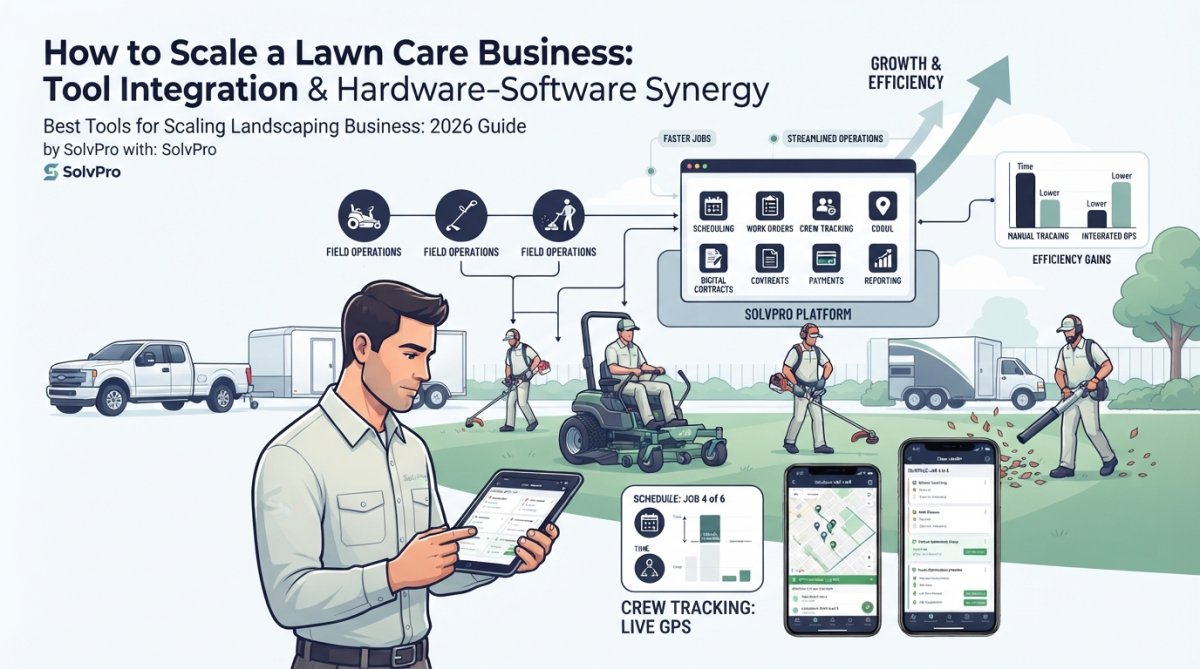
- How to Scale a Lawn Care Business: Tool Integration & Hardware-Software Synergy
- Essential Power & Hand Tools for Scaling Landscaping Crews
Last Updated: July 27, 2026
Scaling a landscaping business requires managing operations, tracking costs, dispatching teams, and getting paid faster while maintaining quality and profitability. At SolvPro, we've helped hundreds of landscaping companies eliminate the chaos that comes with growth. The right software and equipment stack can be the difference between a business that thrives and one that struggles under its own weight.
Most landscaping companies start with spreadsheets, phone calls, and paper invoices. This works at five crews. At fifteen crews? Chaos. Jobs overlap, crews show up to wrong addresses, invoices sit in trucks for weeks, and nobody knows which projects are profitable. The best tools address these pain points by centralizing scheduling, job costing, crew tracking, and payments into integrated platforms your whole team can use from the field.
Why Tool Selection Matters at Each Growth Stage
Your toolkit should evolve as your business grows. A five-person operation can survive on basic scheduling and QuickBooks. A thirty-person operation needs field service management software, GPS tracking, job costing automation, and integrated accounting. The cost of wrong tool decisions compounds over time, a dispatching system that doesn't integrate with accounting means manual data entry, errors, and lost revenue.
The best landscaping companies think of their tech stack as a system, not isolated tools. Scheduling connects to crew tracking. Crew tracking connects to job costing. Job costing connects to accounting. When these pieces fit together seamlessly, you get visibility into what's actually profitable.
Field Service Management & CRM Software for Landscaping Operations
A field service management (FSM) platform is the backbone of any scaling landscaping business. It centralizes scheduling, dispatching, crew tracking, customer communication, and invoicing into one system. Without it, you're managing jobs across email, texts, phone calls, and notebooks, a recipe for missed appointments and customer frustration.
SolvPro: All-in-One Platform for Scaling Teams
SolvPro is built specifically for service businesses like landscaping that need to finish jobs faster and get paid sooner. The platform combines scheduling, work orders, GPS crew tracking, digital contracts, and mobile payments into a single interface for office staff and field crews.
What sets SolvPro apart is its focus on actual landscaping pain points: bilingual support (English and Spanish) for crews, one-tap digital signatures on proposals and contracts, and seamless QuickBooks Online integration so financial data flows automatically without manual entry. The mobile app lets crews see their daily schedule, navigate to jobs with turn-by-turn directions, capture before-and-after photos, and get customer signatures on the job site.
Pros:
- Centralizes scheduling, dispatching, and crew tracking in one platform
- Bilingual support in English and Spanish
- Digital contracts and proposals speed up sales
- Integrates directly with QuickBooks Online for automatic financial syncing
- Mobile-first design means crews actually use it in the field
- Free trial available
Cons:
- Newer platform compared to some enterprise alternatives
- Best suited for small to mid-sized operations (under 30 crews)
Aspire: Enterprise-Grade Solution for Large Operations
Aspire is built for mid-to-large commercial landscaping operations. It integrates CRM, estimating, scheduling, job costing, and accounting into a single system with no data syncing between separate tools.
What makes Aspire powerful is its depth in job costing. It tracks every expense in real time: labor, materials, equipment, subcontractors. You get a live dashboard showing whether a job is on budget or bleeding money. Aspire also has no per-user seat limit, so scaling doesn't trigger pricing jumps.
Pros:
- Purpose-built for landscaping workflows
- Real-time job costing with full expense tracking
- No per-user seat limit
- Integrates with specialized add-ons like Azuga for GPS tracking
- Complete operational visibility from sales to job completion
Cons:
- Expensive and complex for smaller operations
- Custom pricing requires direct contact
- Steeper learning curve
LawnPro: Affordable All-in-One for Growing Businesses
LawnPro targets businesses that have outgrown spreadsheets but aren't yet large enough for enterprise software. It combines scheduling, dispatching, crew management, invoicing, and customer communication in one affordable package.
The standout feature is AI-optimized routing. LawnPro's algorithm builds the most efficient route for each crew every day, saving time, fuel, and crew hours. Automated customer notifications keep clients informed about arrival times and job completion.
Pros:
- Comprehensive features at affordable pricing
- AI-optimized routes save time and fuel costs
- Automated workflows reduce manual scheduling
- Time tracking and mileage tracking built in
- Mobile app works well for field crews
Cons:
- Pricing tiers not publicly listed
- Less depth in job costing compared to Aspire or LMN
- Better for lawn care and maintenance than complex landscaping projects
Landscaping Estimating Software & Job Costing Tools
Estimating and job costing are where most landscaping businesses leave money on the table. A bad estimate means you underbid a job and lose money. Poor job costing means you don't know which jobs are actually profitable until months after completion.
LMN: Industry-Specific Overhead Recovery & Profitability
LMN (Landscape Management Network) was built by landscapers for landscapers. It focuses on estimating with overhead recovery, time tracking, equipment costing, and job profitability analysis.
The unique value is overhead recovery. Most landscaping companies don't understand their true cost to operate. LMN helps you calculate overhead per hour worked, then factors it into estimates so you're not accidentally giving away profit. The platform also provides daily job scoreboards showing crews their actual progress versus the estimate, which keeps teams accountable and helps identify cost overruns early.
Pros:
- Built specifically for landscaping industry
- Overhead recovery focus helps you understand true profitability
- Real-time job scoreboards keep crews on track
- Integrates with payroll for automatic labor cost tracking
- Improves project profitability through better estimating
Cons:
- Pricing not publicly available
- Steeper learning curve
- Best paired with a separate scheduling tool
Workyard: GPS-Verified Labor Costing & QuickBooks Integration
Workyard solves a critical problem: getting accurate labor cost data into your job costing reports. It combines GPS-verified time tracking with direct QuickBooks integration, eliminating manual re-entry that introduces errors.
Crews clock in and out via mobile app, and Workyard verifies their location using GPS. The time data flows directly into QuickBooks job cost reports, so you see labor costs updated in real time. The Elite tier includes an estimates-versus-actuals dashboard, which shows exactly where estimates are off and helps you improve future bidding.
Pros:
- GPS verification ensures accurate time tracking
- Eliminates manual re-entry of labor data into accounting
- Direct QuickBooks integration for seamless financial syncing
- Helps protect margins on time-and-materials contracts
- Estimates-versus-actuals dashboard (Elite tier) improves future bidding
Cons:
- Base fee ($50) plus per-user cost ($6-$13/month) adds up
- Estimates-versus-actuals dashboard only on Elite tier
- Requires separate scheduling tool
| Tool | Best For | Key Strength | Integration |
|---|---|---|---|
| LMN | Complex projects with overhead tracking | Overhead recovery & profitability | Payroll systems |
| Workyard | Field crews with time tracking needs | GPS-verified labor data | QuickBooks Online |
| SolvPro | All-in-one operations | Scheduling + crew tracking + invoicing | QuickBooks Online |
Landscaping Business Management Software: Accounting & Financial Integration
Your accounting software is where financial truth lives. It connects job costing, payroll, invoicing, and profitability analysis. For landscaping companies, the right accounting platform integrates with your field operations so data flows automatically.
QuickBooks Online: Job Costing & Payroll for Landscapers
QuickBooks Online is the industry standard for small-to-medium landscaping businesses. It's built for service businesses and includes solid job costing, project tracking, and payroll integration.
The strength of QBO is its ecosystem. Hundreds of landscaping-specific tools integrate with it, so you can build a connected tech stack without reinventing the wheel. Time tracking apps, invoicing platforms, and crew management tools all feed data into QBO automatically.
Pros:
- Industry-standard with extensive integration ecosystem
- Good for tracking expenses and project profitability
- Payroll integration available
- Mobile app for field access
- Relatively affordable at $30-$200/month depending on plan
Cons:
- Job costing accuracy depends on quality of time data feeding it
- Doesn't automatically calculate landscaping-specific labor costs
- Requires additional tools for full operational visibility
Xero: Modern Cloud Accounting with Integration Ecosystem
Xero is the modern alternative to QuickBooks Online. It's built in the cloud from the ground up and has a cleaner, more intuitive interface that requires less training.
Xero excels at bank reconciliation and cash flow visibility. You see exactly what money is coming in and going out, which matters for landscaping businesses operating on tight margins. The integration ecosystem is strong, with hundreds of apps connecting to Xero.
Pros:
- Superior bank reconciliation and cash flow management
- Clean, intuitive interface with shorter learning curve
- Strong integration ecosystem with time tracking and scheduling tools
- Excellent for managing the banking side of operations
Cons:
- Job costing features less specialized for landscaping than QBO
- May require third-party apps for comprehensive landscaping-specific features
- Pricing plans require checking for specific feature access
GPS Fleet Tracking & Asset Management for Crew Optimization
GPS tracking shows you where your crews are in real time and creates accountability. You see which jobs are running late and can dispatch additional crews or adjust schedules.
Linxup: Real-Time Vehicle & Equipment Tracking
Linxup provides real-time GPS tracking for vehicles, equipment, and crews. You see live location updates on a map, set geofence boundaries to prevent theft, and monitor driver behavior like harsh braking or speeding.
The platform includes dash cam integration for additional safety and accountability. You get alerts when vehicles leave a geofenced area, which helps prevent theft of expensive equipment or vehicles.
Pros:
- Real-time GPS tracking of vehicles, equipment, and crews
- Dash cam integration for safety and accountability
- Geofence alerts prevent theft
- Driver monitoring identifies unsafe behaviors
- Enables faster day-to-day decisions with global asset visibility
Cons:
- Pricing not publicly available
- Focuses on tracking only, requires separate scheduling tool
- Learning curve for setting up geofences and alerts
AI Tools for Landscaping Business: Automation & Route Optimization
AI-powered tools handle route optimization, automated scheduling, and workflow automation. Route optimization is the most impactful AI application for landscaping. Instead of manually assigning jobs to crews, AI algorithms consider distance, crew skills, equipment availability, and time windows to build the most efficient routes automatically. This saves time, reduces fuel costs, and allows you to complete more jobs per day with the same crew count.
Marketing 360®: AI-Assisted CRM & Lead Management
Marketing 360® combines CRM, website building, and marketing automation in one platform. The AI features help you track leads, automate follow-ups, and manage customer communication without manual intervention.
For landscaping companies focused on growth, the lead management and automated email campaigns are valuable. You capture leads from your website, and the platform automatically follows up with estimates, appointment reminders, and seasonal upsells.
Pros:
- All-in-one platform for marketing and business management
- AI-assisted lead scoring and follow-up
- Website builder with landscaping-specific templates
- Access to do-it-for-you marketing programs
- Mobile app for payment acceptance anywhere
Cons:
- Pricing not transparently listed
- May be more comprehensive than needed for operations-focused teams
- Best paired with a dedicated scheduling tool
How to Scale a Lawn Care Business: Tool Integration & Hardware-Software Synergy
Scaling a lawn care business is not about buying more tools. It's about building a system where tools work together, eliminating manual work and creating visibility into what's actually happening on the ground.
Building Your Tech Stack: Software + Equipment Integration
The best tech stacks follow a clear hierarchy: scheduling platform at the center, with accounting, GPS tracking, job costing, and crew management tools feeding into it.
Start with a field service management platform like SolvPro. This becomes your source of truth for jobs, crew assignments, and customer communication. From there, add tools that integrate with it: QuickBooks Online for accounting, Linxup for GPS tracking if you have more than ten crews, and specialized tools like LMN or Workyard only when you've outgrown the basics.
The key is integration. Every tool should feed data into your accounting system automatically. When a crew completes a job in SolvPro, labor hours should flow into QuickBooks without manual entry. Hardware and software work together, a scheduling app is only useful if crews actually use it, and GPS tracking is only valuable if it integrates with your scheduling system so you can reassign work in real time.
Common Mistakes When Scaling: Tool Overload & Integration Gaps
The most common mistake is buying too many tools at once. A team at five crews doesn't need enterprise software, GPS tracking, and three different job costing platforms. You'll overwhelm your team with setup and training.
The second mistake is picking tools that don't integrate. You end up with data in multiple places, and your office manager spends 10 hours per week manually copying data between systems. The third mistake is underestimating training and adoption. A new software platform is only useful if your team actually uses it. Budget time and resources for training, and choose platforms with good mobile interfaces and customer support.
Essential Power & Hand Tools for Scaling Landscaping Crews
Your crews also need the right physical tools to work efficiently and safely. As you scale, investing in quality power tools and hand tools reduces job time, improves quality, and keeps crews safe.
Power Tools: Aerators, Compactors & Efficiency Equipment
Aerators and compactors are essential for lawn care and landscaping operations. Aerators perforate soil to improve water and nutrient absorption. Quality matters here, a cheap aerator that breaks down mid-job costs you the job and frustrates the crew.
For scaling operations, consider whether to own or rent equipment. Small teams (under five crews) often rent equipment as needed. Larger teams (ten+ crews) own equipment to ensure availability and reduce per-job costs. Track equipment usage and maintenance costs in your job costing system so you know the true cost to operate each piece of equipment.
Hand Tools & Precision Equipment for Quality Work
Hand tools, pruning shears, shovels, rakes, trimmers, are where quality actually happens. A dull pruning shear tears branches instead of cutting them cleanly, which damages the plant and looks unprofessional. Invest in quality hand tools and maintain them properly. For scaling operations, standardize tools across crews so they can borrow or share tools as needed. Create a tool inventory system and track maintenance.
Frequently Asked Questions
What software do most professional landscaping companies use for scaling operations?
Professional landscaping companies typically use integrated platforms that combine field service management, CRM, and job costing. Enterprise-grade solutions like Aspire serve large commercial operations, while mid-market businesses often choose LMN or LawnPro for industry-specific features. Smaller teams scaling up frequently start with all-in-one field service platforms that include scheduling, dispatching, invoicing, and crew tracking, avoiding the complexity of managing multiple disconnected tools. The best choice depends on your current crew size and growth trajectory.
How can landscaping business management software actually accelerate scaling?
Landscaping business management software eliminates manual paperwork, enabling faster invoicing and payment collection, critical for cash flow during growth. It centralizes crew scheduling, dispatch, and GPS tracking, reducing administrative overhead and allowing one person to manage larger teams. Job costing integration reveals which services are most profitable, guiding pricing decisions. Automated workflows for estimates, contracts, and recurring billing reduce errors and free your time for business development rather than back-office tasks.
What's the difference between landscaping estimating software and general accounting tools?
Landscaping estimating software like LMN and Workyard is built for the industry's unique needs: overhead recovery calculations, equipment costing, crew time tracking, and labor burden analysis. General accounting tools like QuickBooks Online or Xero excel at financial reporting and tax compliance but require manual input of landscaping-specific data. The best approach integrates both: use landscaping-specific estimating software to capture accurate job costs, then sync data to your accounting platform for financial reporting and payroll processing.
Should I invest in GPS fleet tracking and power tools before scaling my crew size?
GPS fleet tracking becomes valuable once you have 3+ crews working simultaneously across multiple job sites, it prevents wasted time and fuel, improves safety, and verifies labor hours for accurate job costing. Power tools like aerators and compactors should scale with your service offerings, not your crew size; invest in them when you expand into new service lines. Start with essential hand tools and basic power equipment, then add GPS tracking and specialized equipment as your business reaches 4-10 crews, when operational complexity justifies the investment.
This article was written using GrandRanker