 listicle
Best Software for Septic Service Scheduling: 2026 Guide
Table of Contents
- What Is Septic Service Management Software?
- Why Septic Companies Need Dedicated Scheduling Software
- Top Septic Service Scheduling Software Options
- 1. SolvPro: All-in-One Field Service Management for Growing Teams
- 2. SepticMind: Purpose-Built Permit Tracking and Compliance
- 3. ServiceCore: Waste Disposal and Route Optimization Focus
- 4. FieldPulse: Real-Time Dispatching and Mobile Invoicing
- 5. Ascora: Drag-and-Drop Scheduling with Compliance Forms
- 6. WorkWave Service: Advanced Optimization for Scaling Operations
- Septic Dispatch Software: Real-Time Routing and Crew Coordination
- Septic Inspection Software and Compliance Reporting
- Septic Software Pricing: What You'll Actually Pay
- How to Choose the Right Septic Scheduling Software for Your Business
- Key Features Every Septic Scheduling Software Should Have
Best Software for Septic Service Scheduling: 2026 Guide
Last Updated: July 26, 2026
What Is Septic Service Management Software?
Septic service management software is a specialized field service platform designed for septic companies' unique operational demands. Businesses switching from spreadsheets and manual scheduling to dedicated software cut administrative overhead by half while improving response times to emergency calls.
These platforms centralize scheduling, work orders, crew tracking, invoicing, and customer records into a single mobile-accessible system. Unlike generic field service tools, the best septic software includes features built specifically for pumping operations, tank inspections, permit compliance, and recurring maintenance cycles. Purpose-built septic platforms automatically generate compliance reports that local health departments require, track disposal logs, and manage tank capacity data.
Why Septic Companies Need Dedicated Scheduling Software
Disorganized operations cost more than most owners realize. When crews use paper job tickets, office staff manage schedules in spreadsheets, and invoices sit in truck cabins for days, three problems cascade: delayed cash flow, missed recurring appointments, and regulatory compliance gaps.
A five-person crew spending 45 minutes daily on administrative tasks loses nearly 200 billable hours per crew annually. Scheduling software eliminates most of this friction.
Septic companies also face regulatory pressure that generic tools don't address. County health departments require specific documentation for pumping operations, inspection records, and tank maintenance intervals. Purpose-built septic software generates compliant reports automatically, reducing fines and permit loss risks.
Emergency response is critical. When a customer calls with a backed-up system, dispatchers need to know which crews are closest, what equipment is available, and whether the technician has the right permits for that county. Real-time scheduling answers this in seconds; manual systems take 20-30 minutes.
Top Septic Service Scheduling Software Options
1. SolvPro: All-in-One Field Service Management for Growing Teams
SolvPro combines scheduling, work orders, crew tracking, digital contracts, and payment processing into a single interface that works seamlessly on mobile and desktop.
What makes SolvPro stand out for septic operations is bilingual support in English and Spanish. Many septic service teams work with bilingual crews, and SolvPro handles this natively, work orders, customer communication, and invoices all support both languages without awkward switching.
The QuickBooks Online integration means invoices and payments sync automatically to your accounting system, cutting days off your cash conversion cycle.
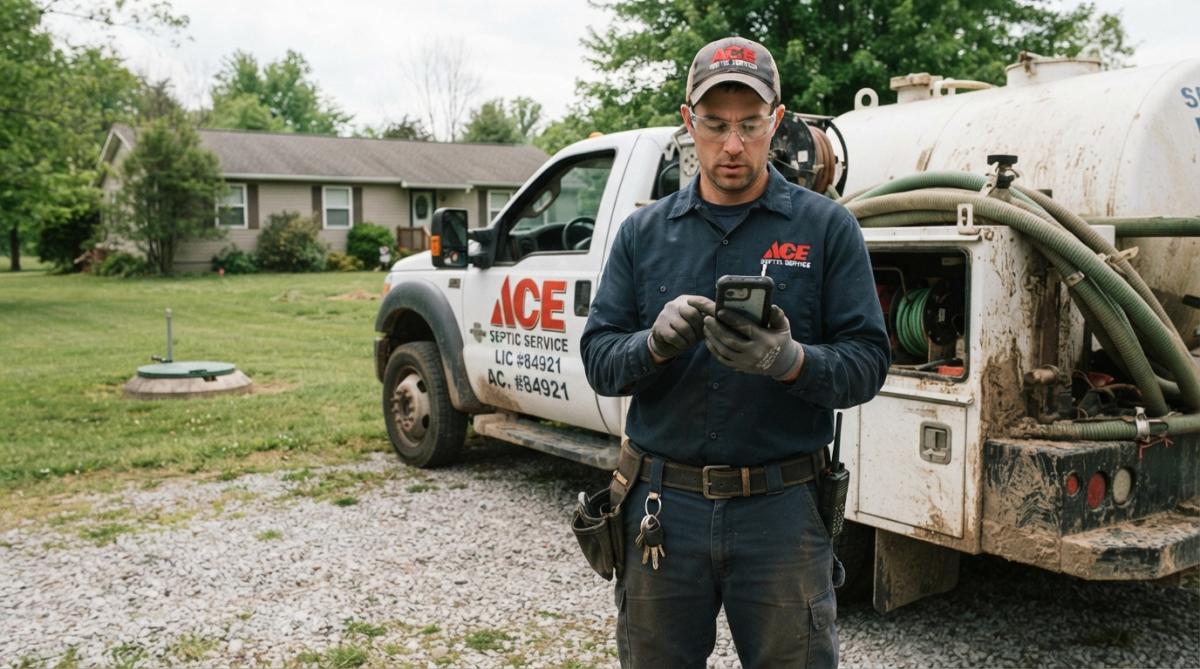
Key Features:
- Drag-and-drop scheduling with real-time crew tracking
- Digital proposals and contracts signed on-site
- Mobile app for invoicing and payment collection
- Bilingual support (English/Spanish) built-in
- QuickBooks Online integration for automatic accounting sync
Best For: Growing septic companies with 5-15 crews wanting to simplify operations.
Pros:
- Intuitive interface; teams get productive within days
- Seamless bilingual functionality
- Mobile-first design for field management
- Affordable, scalable pricing
Cons:
- Septic-specific compliance features require manual setup
- Reporting is functional but not enterprise-level
2. SepticMind: Purpose-Built Permit Tracking and Compliance
SepticMind is built exclusively for septic operations. It includes a county permit database covering all 50 states with forms, fees, timelines, and regulatory contacts, saving hundreds of hours annually on compliance research.
The AI service interval prediction analyzes tank capacity, household size, and historical pump volume to predict optimal service timing, reducing emergency calls and creating predictable recurring revenue.
Digital inspection forms generate PDF reports automatically, satisfying local health department requirements.
Key Features:
- County permit database (all 50 states) with forms, fees, and contacts
- AI-powered service interval prediction
- Digital inspection forms with automatic PDF report generation
- Dispatch, scheduling, and route optimization
- Technician mobile app and customer portal
Starting Price: $79/month (full platform); Enterprise plan at $499/month
Best For: Pure-play septic operations doing 50+ pumping calls monthly.
Pros:
- Only platform with purpose-built permit tracking across all 50 states
- AI service interval prediction reduces emergency calls
- Comprehensive septic-specific workflows
Cons:
- Newer platform with smaller user community
- Steeper learning curve for AI-driven features
3. ServiceCore: Waste Disposal and Route Optimization Focus
ServiceCore is purpose-built for portable toilet, septic, and dumpster rental operations. It handles the full lifecycle: scheduling recurring pickups, optimizing routes to reduce fuel costs, tracking disposal manifests, and automating billing.
Route optimization uses real-time traffic data to group jobs efficiently, reducing drive time and fuel consumption. For companies managing 20+ recurring stops daily, this translates to meaningful cost savings.
Waste disposal manifest tracking automates logging of where waste goes, volumes disposed, and facility records, documentation health departments require during inspections.
Key Features:
- 28-day billing and recurring job automation
- Route optimization with real-time traffic integration
- Inventory tracking and waste disposal manifest management
- Dispatch and invoicing in one system
Best For: Septic companies pumping tanks and managing recurring maintenance contracts with 5+ crews.
Pros:
- Purpose-built for waste operations
- Strong route optimization reduces fuel costs significantly
- Excellent for recurring job management and manifest compliance
Cons:
- Pricing not publicly available
- May require customization for non-standard workflows
4. FieldPulse: Real-Time Dispatching and Mobile Invoicing
FieldPulse offers real-time scheduling based on technician location and availability. The system assigns jobs to the nearest available crew, optimizes routes automatically, and updates customers with real-time arrival notifications.
Mobile invoicing is fast: technicians create estimates on-site, convert them to invoices, and collect payment before leaving. Real-time inventory monitoring tracks materials and tools, preventing crews from arriving unprepared.
Starting Price: $99/month (roughly $99-$299/month depending on features)
Best For: Septic businesses growing from 3-10 crews needing better operational control.
Pros:
- Enhances efficiency and reduces manual errors
- Mobile-friendly platform for managing customers, estimates, and invoices
- Supports scheduling workflows and repeat visits
Cons:
- Lacks septic-specific compliance features like permit tracking
- Per-user pricing becomes expensive for larger crews
5. Ascora: Drag-and-Drop Scheduling with Compliance Forms
Ascora simplifies job assignment with a visual drag-and-drop scheduler. Technicians and customers see real-time updates. The mobile app lets technicians log inspections, pumping, and repairs on-site with photo documentation and compliance checklists.
Quote-to-invoice functionality works directly from the field, eliminating back-office delays. Digital forms for compliance and inspection records ensure required documentation is captured in the field.
Best For: Septic service providers with 5-12 technicians looking for an all-in-one platform with compliance and field documentation focus.
Pros:
- Simplifies job assignment with visual scheduler
- Enhances team coordination and efficiency
- Comprehensive mobile app for field operations
Cons:
- Pricing not publicly available
- Compliance form customization may require support assistance
6. WorkWave Service: Advanced Optimization for Scaling Operations
WorkWave Service delivers high-powered optimization tools designed for field service businesses scaling beyond 15 crews. Sophisticated scheduling and dispatching minimize travel time and maximize crew use.
Customer management and technician mobile apps keep everyone aligned. Invoicing and payment processing integrate with accounting systems. The reporting and analytics dashboard tracks crew performance, revenue trends, and operational metrics.
Best For: Septic installers and service companies with 15+ crews operating across multiple counties.
Pros:
- High-powered platform with advanced optimization
- Comprehensive features for managing service operations
- Scalable platform designed for growth
Cons:
- Pricing not publicly available
- May require customization for septic-specific compliance needs
Septic Dispatch Software: Real-Time Routing and Crew Coordination
Dispatch software is the nervous system of a septic operation. When a customer calls with an emergency, dispatchers need to know instantly which crew is closest, what equipment they're carrying, and whether they have the right permits. Real-time dispatch software does this in 90 seconds; manual dispatch takes 20-30 minutes.
The best septic dispatch software shows crew locations on a live map, displays job details and customer history, and routes jobs automatically based on proximity and crew skill level. GPS tracking serves dual purposes: operational efficiency and accountability. Route optimization algorithms group jobs geographically to minimize drive time. For a crew handling 8-12 calls daily, efficient routing saves 45-90 minutes of drive time daily, 150-300 hours annually per crew.
Septic Inspection Software and Compliance Reporting
Septic inspections concentrate compliance risk. County health departments require specific documentation: tank condition, pump functionality, baffle condition, and soil absorption field status. Missing inspection records can result in fines or permit suspension.
Inspection software captures all required data in the field using digital forms. Technicians photograph tank conditions, document findings, and the system generates compliance-ready reports automatically.
Platforms include templates for different inspection types: routine maintenance, pre-sale inspections, repair verification, and system failure investigations. Automated report generation saves office staff hours and accelerates the inspection-to-approval cycle.
| Inspection Type | Required Documentation | Compliance Risk | Software Benefit |
|---|---|---|---|
| Routine Pumping | Disposal log, tank condition, pump status | Medium | Automated disposal logging |
| Pre-Sale Inspection | Full system assessment, baffle condition, soil absorption field | High | Digital forms, photo documentation |
| Repair Verification | Work completed, system functionality test | Medium | Photo evidence, technician sign-off |
| System Failure | Root cause analysis, remediation steps, follow-up schedule | High | Detailed inspection templates, automated reporting |
Septic Software Pricing: What You'll Actually Pay
Pricing varies significantly based on features, team size, and whether you need septic-specific compliance tools.
General-purpose field service software typically starts at $99-$199/month for small teams (up to 5 crews) and scales from there. Per-technician pricing models become expensive at 15+ crews.
Purpose-built septic software often uses flat-rate models that don't penalize growth. SepticMind charges $79/month for the full platform regardless of team size, a significant advantage for growing companies.
Some platforms charge by active jobs per month, others use per-technician pricing, and a few offer unlimited-user pricing. Budget $500-$2,000 for implementation when migrating from spreadsheets.
For SolvPro, pricing depends on team size and required features. Visit solvpro.com for current pricing and start your free trial.
How to Choose the Right Septic Scheduling Software for Your Business
Choosing the right software requires evaluating feature fit, implementation effort, scalability, and cost. Start by mapping your current workflow: How many crews? How many calls daily? What compliance requirements apply in your jurisdictions? Do you have bilingual crews?
Feature fit is the first filter. Multiple counties with different permit requirements? Permit tracking becomes critical. Bilingual crews? Bilingual support matters. 200+ calls monthly? Route optimization becomes valuable.
Implementation effort is often underestimated. Switching from spreadsheets requires data migration, form customization, and team training. A platform taking 2 weeks to implement is worth more than one taking 8 weeks, even if cheaper.
Onboarding and Implementation Process
Most vendors offer 2-4 week implementation timelines for small to mid-sized teams. The best vendors assign a dedicated implementation specialist handling data migration and customization.
Training should be hands-on. Your office manager needs to understand scheduling and crew management. Technicians need to know how to accept jobs, update status, and create invoices on phones. Budget 3-4 hours training per team member.
Post-launch support during the first 30 days is critical. Most teams encounter edge cases training doesn't cover.
Integration with Your Existing Tools
QuickBooks integration is essential. Invoices and payments must sync automatically to your accounting system. Look for platforms integrating with your payment processor and email system.
GPS and mapping integrations help with route optimization. Platforms integrating with Google Maps or Mapbox provide real-time traffic data for routing decisions.
Scalability: From 5 Crews to 15+
The software you choose today must grow with you. Evaluate how pricing scales. Flat-rate pricing is ideal for growth; per-technician pricing becomes expensive as you add crews.
Consider how the interface scales. Drag-and-drop scheduling works for 5-10 crews but becomes cluttered at 20. Advanced platforms include filters, saved views, and customizable dashboards.
Reporting and analytics become more important at scale. A 15-crew operation needs dashboards showing crew productivity, revenue per technician, response times, and customer satisfaction metrics.
Rural Septic Operations and Software Solutions
Rural operations face unique challenges. Service areas span 50-100+ miles, meaning longer drive times and fewer jobs per day per crew. GPS tracking and route optimization become more valuable because fuel costs are higher percentages of operating costs.
Permit tracking becomes more complex because regulations vary significantly by county. Ensure the software works offline. Crews should accept jobs, update status, and create invoices without constant internet connectivity. Data syncs automatically when connectivity returns.
Customer portal functionality helps rural operations because customers are geographically dispersed.
Key Features Every Septic Scheduling Software Should Have
Certain features are non-negotiable for efficient, compliant operations.
Real-time scheduling and dispatch shows crew locations on a map, assigns jobs automatically based on proximity and skill level, and notifies customers of arrival windows.
Mobile-first work orders let technicians see job details, customer history, and special instructions on phones. They update job status, log time, and add notes from the field.
Compliance-ready inspection forms capture required documentation in the field. The system generates PDF reports automatically satisfying local health department requirements.
Recurring service automation schedules maintenance based on tank capacity, household size, and service history, preventing forgotten annual pumpings.
Integrated invoicing and payments let crews collect payment on-site with automatic accounting system syncing, accelerating cash flow.
Crew and customer communication is built-in. Automated SMS notifications alert customers to arrival windows. Job updates flow to crews automatically.
Reporting and analytics show crew productivity, revenue per technician, response times, and customer satisfaction metrics informing staffing and pricing decisions.
Offline functionality is critical for rural operations. Crews work without constant internet; data syncs automatically when connectivity returns.
Septic companies delaying dedicated software are choosing to stay inefficient. Administrative overhead, delayed invoicing, and compliance gaps compound annually. The best septic service scheduling software eliminates these friction points, accelerates cash flow, and reduces regulatory risk. SolvPro makes this transition straightforward with bilingual support, QuickBooks integration, and an intuitive interface your team can use productively within days. Start your free trial at solvpro.com and see how much time your operation can recover.
Frequently Asked Questions
What features should septic service scheduling software have?
Essential features include drag-and-drop scheduling, real-time GPS tracking for technicians, mobile work orders with digital forms, automated recurring service reminders, invoicing and payment processing, customer portal access, and compliance reporting. For septic-specific operations, look for permit tracking, tank size documentation, disposal log management, and inspection templates. Integration with QuickBooks or your accounting software is critical for streamlining billing and reducing manual data entry between systems.
How can septic dispatch software reduce fuel costs and improve response times?
Septic dispatch software uses route optimization and GPS tracking to assign jobs based on technician proximity and availability, eliminating backtracking and unnecessary mileage. Real-time dispatching lets you respond faster to emergency calls without manual phone coordination. By clustering nearby jobs and optimizing travel sequences, crews complete more service calls per day with less fuel consumption. Many platforms also provide analytics showing fuel efficiency gains and crew productivity metrics to help you identify further savings opportunities.
Can I use general field service software for my septic business, or do I need septic-specific software?
General field service management software handles basic scheduling, invoicing, and dispatch well. However, septic-specific platforms like SepticMind and ServiceCore include built-in compliance features such as state permit databases, inspection templates, tank maintenance history tracking, and disposal log documentation, critical for regulatory compliance. If your state requires specific inspection records or permit tracking, purpose-built septic software saves significant time. For smaller operations without complex compliance needs, general field service software may suffice, but you'll likely manage compliance manually.
How does septic inspection software help with documentation and customer communication?
Septic inspection software lets technicians complete digital inspection forms on-site with photos, checklists, and tank measurements. The system automatically generates PDF reports that can be emailed to customers immediately, improving transparency and customer satisfaction. Digital documentation creates a permanent service history for each customer, helping you track maintenance intervals, identify recurring issues, and schedule preventive services. Many platforms integrate with customer portals, allowing homeowners to view their service records and receive automated maintenance reminders, reducing callback questions and improving customer retention.
This article was written using GrandRanker