 ultimate-guide
Track Field Crew Performance: A Step-by-Step Guide
Table of Contents
- Why Tracking Field Crew Performance Matters
- Set Clear Goals and Define Field Service Management KPIs
- Choose the Right Field Service Tracking Tools
- Implement Field Service Performance Metrics Examples
- How to Measure Field Technician Efficiency in Real Time
- Conduct Regular Performance Reviews and Feedback Loops
- Overcome Field-Specific Cultural Resistance to Tracking
- Common Mistakes When Tracking Field Crew Performance
Track Field Crew Performance: A Step-by-Step Guide
Last Updated: July 13, 2026
Learning how to track field crew performance is essential for service businesses that want to finish jobs faster, reduce scheduling chaos, and ensure accountability across distributed teams. Without proper tracking systems, you lack visibility into whether tasks are on schedule, quality standards are met, or time is spent efficiently.
At SolvPro, we've helped hundreds of service businesses implement field crew performance tracking systems that improve operational efficiency, reduce project delays, and create accountability without breeding resentment.
Below, we'll walk you through exactly how to track field crew performance, from setting clear goals to implementing the right tools, measuring real-time efficiency, and overcoming resistance when introducing monitoring systems to field teams.
Why Tracking Field Crew Performance Matters
Performance management for field operations isn't about micromanagement. It's about creating visibility where none exists and building a system where your team knows exactly what success looks like.
Field crews operate differently than office-based teams. Your technicians, installers, and service professionals are scattered across job sites, often working without direct supervision. This creates an information gap: you don't know if jobs are on schedule, if safety protocols are followed, or if time is spent efficiently. This gap costs money.
The real value of tracking field crew performance is threefold: it creates accountability, generates data for informed decisions, and creates opportunities for coaching and development. When your team knows their work is being measured, they adjust their behavior. When you have data, you can identify which technicians are consistently faster, which have higher customer satisfaction, and which need additional training.
Set Clear Goals and Define Field Service Management KPIs
Before implementing any tracking system, define what you're actually measuring. Start by asking: What does success look like for this crew member? What behaviors and outcomes do I want to encourage?
Aligning individual goals with company objectives
Field crew performance tracking only works when individual goals connect to company goals. A technician whose only metric is "jobs completed per day" will rush through work and skip safety checks. A technician whose goals include "customer satisfaction score above 4.5 stars," "zero safety incidents," and "average job time within 10% of estimate" will work differently.
Your company goal of "increase revenue by 15% while maintaining customer satisfaction above 4.7 stars" translates to crew goals like "complete 3-4 jobs per day" (productivity), "maintain 4.7+ star rating" (quality), and "follow pre-job and post-job checklists 100% of the time" (safety and compliance). When your crew understands how their individual performance connects to company outcomes, they see tracking as fair rather than punitive.
Establishing accountability through goal clarity
Accountability requires three things: clear expectations, visible measurement, and regular feedback. Start with written, specific goals. "Work harder" is not a goal. "Complete 3.5 jobs per day on average, with each job finishing within 10% of the time estimate" is a goal.
Document these goals in your field service management software so they're visible to the crew. When a technician completes a job, they should see how it compares to the estimate. When they finish a week, they should see whether they hit their productivity target. This visibility creates self-correction.
Choose the Right Field Service Tracking Tools
The tool you choose determines what you can measure and how easily you can act on the data. A comprehensive field service management platform gives you location, task completion, time tracking, customer feedback, and safety compliance all in one place. The tool should make tracking easier for your crew, not harder.
Real-time vs. retrospective tracking: Which approach fits your crew
Real-time tracking means you can see where your crew is, what job they're on, and how long they've been there as it happens. You get instant notifications if someone deviates from the schedule.
Retrospective tracking means you collect data after the fact, time entries, job completion reports, photos, customer feedback, and analyze it daily or weekly. You don't know in real-time that a job is running over, but you do know by end of day.
Real-time tracking is more invasive and works well for large crews where coordination is complex. Retrospective tracking works better for small teams with stable job schedules. Many businesses use a hybrid approach: GPS location tracking in real-time, but time and task data collected at job completion.
Hardware vs. software integration considerations
Some field service management solutions rely on dedicated hardware; others work entirely through smartphones that your crew already owns.
Dedicated hardware ensures consistency and easier compliance enforcement, but it's more expensive and complex to manage. Smartphone-based solutions are cheaper and easier to deploy, but you have less control over device quality and availability.
For small crews (under 10 people), smartphone-based solutions usually work fine. For larger crews or high-risk work where compliance is critical, dedicated hardware is worth the investment.
Implement Field Service Performance Metrics Examples
The metrics you track determine the behavior you create. Balance metrics that measure productivity, quality, and compliance.
Task completion rate and operational efficiency
Task completion rate is how many jobs a technician completes in a given time period, usually per day or per week. But task completion rate is only useful if you also track time-to-completion accuracy. A technician who completes 5 jobs per day but finishes jobs 50% faster than the estimate is either rushing or gaming the system.
Operational efficiency combines these metrics: (Jobs completed per day) × (Time estimate accuracy) × (First-time completion rate, jobs that don't require a callback). A job requiring a callback costs you time, fuel, and customer satisfaction.
Track these metrics weekly, not daily. Weekly averages show the real trend.
Safety and compliance metrics for field operations
Safety metrics should be non-negotiable. This includes documented safety incidents, near-misses, and compliance with pre-job and post-job checklists. Document every incident, no matter how minor. When you see patterns, you can intervene with training or process changes.
Compliance metrics track whether your crew follows required procedures: "pre-job safety checklist completed before starting work" (100% compliance expected), "photo documentation of damage before repair" (100% compliance), or "customer signature on work order before leaving site" (100% compliance). For field operations, compliance metrics often matter more than productivity metrics.
How to Measure Field Technician Efficiency in Real Time
Real-time efficiency measurement means you can see how a technician is performing during the day, not just at the end of the week.
Using mobile workforce dashboards for instant visibility
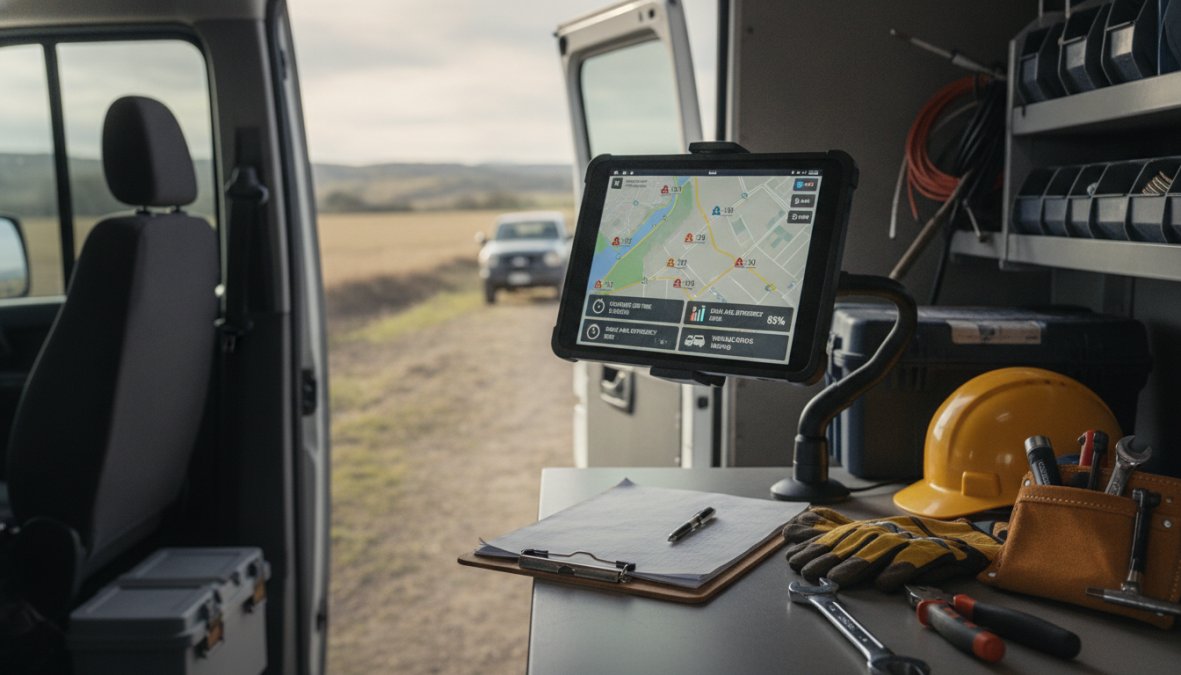
A mobile workforce dashboard shows you where each technician is, what job they're on, how long they've been on that job, and whether they're on track with the estimate. The best dashboards also show customer feedback in real-time.
The dashboard should be accessible to crew members too. A technician should be able to see their own performance metrics, how many jobs they've completed today, and whether they're ahead or behind on time estimates. This self-awareness drives performance improvement.
Real-time dashboards work best when connected to your scheduling system. If a job is running over, the dashboard should alert you so you can reassign the next job to someone else. The data should be actionable: "Technician 5 has been at this job for 2 hours but the estimate was 1.5 hours, call and check if there's a problem."
GPS tracking and workflow optimization for remote teams
GPS tracking shows you where your crew is at any moment. For field service businesses, this confirms that technicians are actually at the job site, helps with routing and scheduling, and provides evidence if a customer disputes whether work was done.
GPS data becomes powerful when combined with workflow data. A technician's GPS location plus their job status plus their time tracking tells a story. Workflow optimization means using GPS and time data to improve routing. If you can see that technician A spends 45 minutes driving between jobs while technician B spends 20 minutes, you can adjust territories or batch jobs differently to reduce drive time.
Tell your crew upfront that you track location and why: for routing optimization, for customer safety, and for accountability. Transparency builds trust.
Conduct Regular Performance Reviews and Feedback Loops
Tracking data is useless if you don't act on it. Regular performance reviews turn data into coaching conversations. Monthly reviews are a good baseline.
A performance review isn't about punishment. It's about understanding performance, identifying obstacles, and planning improvement. Start by reviewing the data together, then ask questions. If someone's productivity is down, why? Are the estimates wrong? Are the jobs more complex? Is there a personal issue?
Data-driven coaching means using performance metrics to guide the conversation with curiosity rather than judgment. "Your average job time is 2.5 hours but the estimate is 2 hours, what's happening?" invites conversation and problem-solving.
Regular feedback loops mean continuous communication about performance. If someone completes a job with a 4.2-star customer rating, acknowledge it that day. If someone's productivity drops 20% week-over-week, check in immediately.
Overcome Field-Specific Cultural Resistance to Tracking
Introducing performance tracking to field crews creates resistance. Field professionals are used to working without supervision and being judged by results, not by how they spend their time. Tracking feels invasive and controlling.
Start by explaining why you're implementing tracking. "We're implementing GPS tracking so we can optimize routing and get you to jobs faster, saving you drive time" is very different from "We're implementing GPS tracking to catch you slacking."
Involve your crew in setting the metrics. Ask them: "What's a realistic target?" They'll often propose higher targets than you would, because they understand what's achievable.
Show them the benefits immediately. If GPS tracking and routing optimization reduces drive time by 20%, they'll see it in their schedule. They'll finish work earlier. That's tangible benefit that offsets the discomfort of being tracked.
Start small. Pick one metric, one team, and run it for a month. Gather feedback. Adjust. Then expand.
Common Mistakes When Tracking Field Crew Performance
Tracking too many metrics. Pick 3-5 metrics that directly impact your business. Everything else is secondary.
Setting unrealistic targets. Set targets that are challenging but achievable, ideally targets that your best performers already hit.
Measuring activity instead of outcomes. Track how many jobs they complete and how satisfied customers are, not just how many hours someone works.
Ignoring external factors. A technician's productivity might drop because they're working in a new territory with longer drive times, or because they're training a new crew member, or because the jobs are more complex.
Not communicating about tracking. Be explicit about what you're tracking, how you're using the data, and how it affects your crew.
Using tracking as punishment. Use data for improvement first. If someone's productivity is down, coach and support them before cutting hours.
Failing to act on the data. Review data regularly and take action: coaching, training, process changes, whatever's needed.
Not providing the tools to succeed. If someone's consistently behind on time estimates, the estimates might be wrong, not the technician.
Tracking field crew performance transforms a distributed, invisible operation into a manageable, accountable system. The key is implementing it thoughtfully, with clear goals, fair metrics, transparent communication, and a focus on coaching rather than punishment.
SolvPro centralizes field crew tracking, scheduling, and performance data in one platform, eliminating the need to piece together information from GPS apps, time tracking systems, and customer feedback tools. With real-time dashboards, automated job completion tracking, and integrated customer feedback, you get the visibility you need to make data-driven decisions about routing, staffing, and crew development. Start a free trial and see how much clearer your field operations become.
Frequently Asked Questions
What are the best KPIs for measuring field crew performance?
Essential field service management KPIs include task completion rate, job duration accuracy, customer satisfaction scores, first-time fix rate, and safety incident frequency. For field technicians, track response time to jobs, billable hours vs. total hours, and quality of work (measured by rework requests). Choose metrics aligned with your business goals, whether that's speed, quality, or customer retention. Real-time monitoring helps identify performance gaps quickly.
How do I monitor field employees without micromanaging?
Focus on outcomes rather than constant surveillance. Set clear performance goals and use automated field service tracking tools that capture data passively, GPS location, task completion, time on job. Review analytics weekly rather than in real-time. Establish trust by communicating why you're tracking (operational efficiency, safety, better scheduling) and share insights that help crews work smarter. Regular feedback loops and coaching show you care about development, not just control.
What's the difference between real-time and retrospective performance tracking?
Real-time tracking monitors field crew activity as it happens, GPS location, task status, time spent on jobs. This enables instant intervention if schedules slip or safety issues arise. Retrospective tracking reviews performance data after work is completed, useful for coaching and benchmarking. Most effective field service management combines both: real-time alerts for critical issues, plus weekly/monthly reviews for coaching and process improvement. Your choice depends on crew size, job complexity, and safety requirements.
Which field service tracking tools integrate with existing systems?
Leading field service tracking tools offer CRM integration, QuickBooks Online connectivity, and mobile-friendly platforms. Look for solutions that centralize scheduling, work orders, crew tracking, and payments in one place, reducing manual data entry. Hardware vs. software integration matters: some tools work with GPS devices, others rely on smartphone apps. Evaluate whether you need GPS tracking for remote teams, mobile workforce dashboards for real-time visibility, or both. Start with a free trial to test compatibility with your workflow.
This article was written using GrandRanker